v1.0 · iOS 17+ · On-device

A notebook
that thinks
on-device.

Capture one thought, or empty your whole head in one breath. Notes split and cluster themselves by meaning, reminders surface from plain language, and your questions get answered without leaving your phone. No servers, no accounts, no telemetry.
Size270 MB · models extra
NetworkNever required
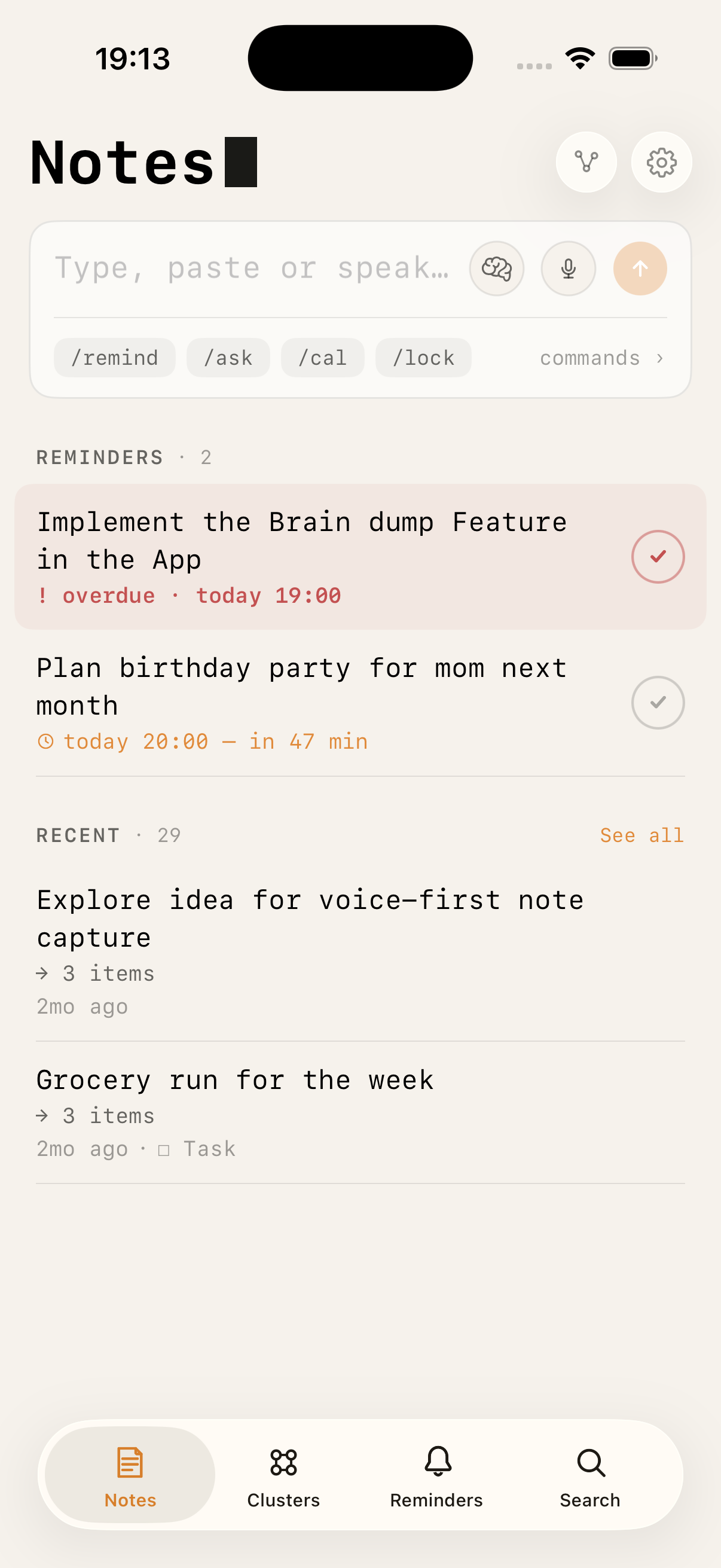
Local AI Notes — capture box, reminders and recent notes
No network calls during indexing384-dim MiniLM embeddingsCore ML · Neural Engine
What you can do

A notebook that listens,
plans, and answers.

One input box. Everything else — organisation, reminders, calendar, search, answers — happens through plain text and voice. No folders, no settings mazes.

Capture

Type, paste, or speak.

Bullet points, long thoughts, dictated meeting notes. On-device speech recognition works offline and never leaves the phone. Siri and the Action Button start a voice note without opening the app.

"remind me friday at 10 about the boss meeting"
Dump

Empty your head in one go.

Speak or type everything at once, or start with the /dump command. The dump is split into separate notes, reminders and calendar events, each keeping its own date and time. You review the proposal before a single item is created.

/dump call boss tomorrow at 9 and prep slides friday
Organise

Topics appear on their own.

Fuzzy clustering puts a single note in several topics by degree — 72 % Work, 21 % Planning, 7 % Ideas — the way a real thought belongs to many things at once.

no folders · no manual tags
Remember

Reminders from plain language.

"Next Tuesday at 3", "Freitag 10 Uhr", "tomorrow afternoon" — parsed automatically. Day, Week and Month views keep everything in sight.

/remind · NSDataDetector + regex
Schedule

Straight to your calendar.

/calendar writes an EventKit event. iOS syncs it to iCloud, Google, Outlook automatically — no extra account setup inside the app.

/calendar meeting friday 2pm with Sarah
Ask

Answers from your own notes.

/ask retrieves the most relevant notes by meaning, synthesises an answer, and saves it. Works without an LLM via extractive summary; becomes conversational in Smart Mode.

/ask what's still open this week?
Connect

Related notes, while you write.

Pause typing for half a second and the two closest notes in meaning appear under your draft. Saved notes keep their connections through shared meaning, shared tags and shared days.

debounced 500 ms · cosine ≥ 0.5
Protect

Lock a note with Face ID.

Mark anything private and it's sealed behind biometrics. Password fallback lives in the Keychain, device-only. Encrypted exports use AES-GCM with a key derived from your password.

/lock
Back up

Backups that run themselves.

Full encrypted backups land in a folder you choose, on-device or in iCloud Drive, whenever the app opens and your interval has elapsed. A backup restores through the normal import flow.

AES-GCM · your password, your key
What it does

Writing stays simple.
The structure emerges.

You write one note at a time. The app reads each note into a 384-dimensional vector, compares it to every other note with cosine similarity, and groups them into fuzzy clusters. No tags required, no folders to maintain.

Automatic clusters

Notes with similar meaning gather themselves. One note can belong to multiple clusters at different strengths — exactly like real ideas do.

Fuzzy C-Means · 384-d vectors
/

Slash commands

/remind parses dates. /ask answers from your own notes. /dump splits a stream of thought into separate items. /lock seals the note behind Face ID. Type, don't tap.

/remind · /ask · /dump · /calendar · /lock

Knowledge graph

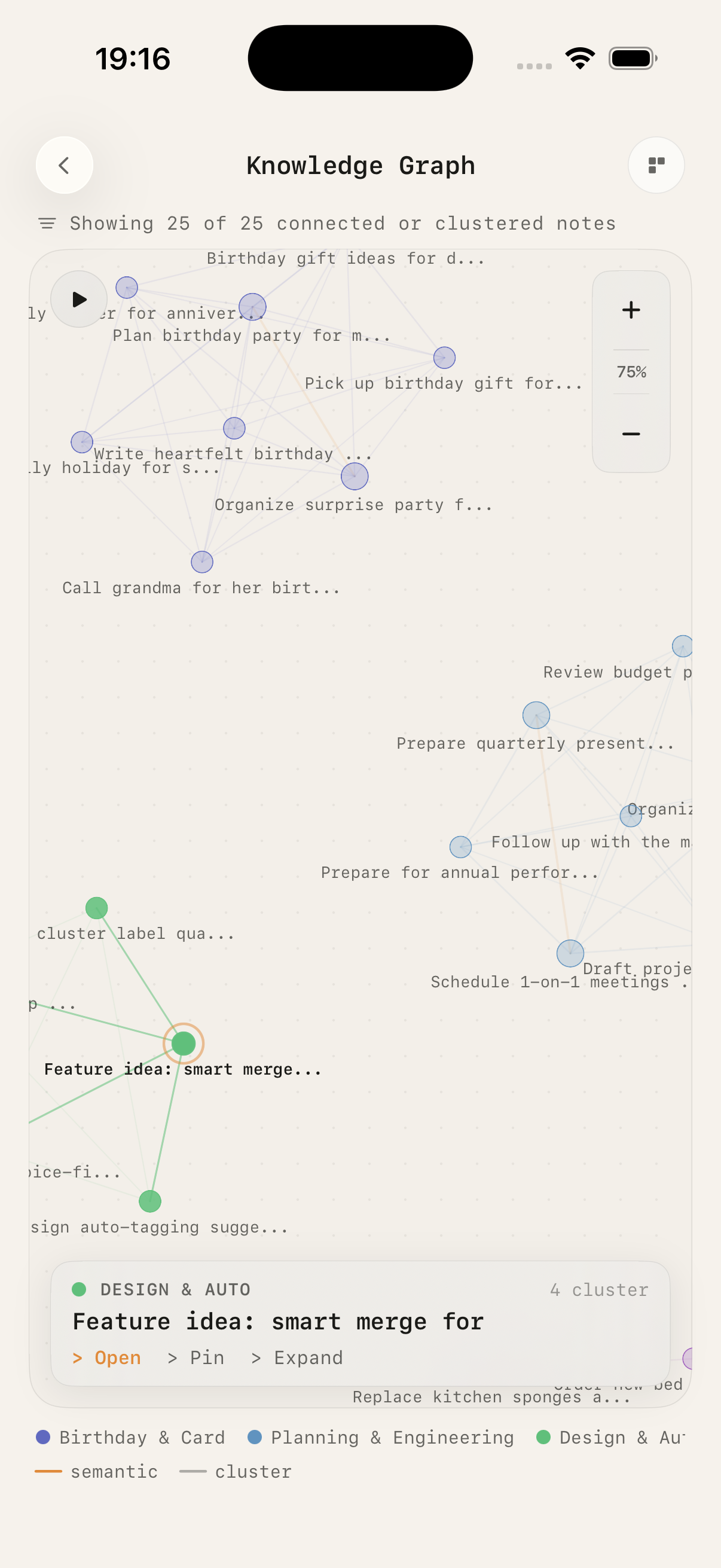
See how every note connects. Force-directed layout with 200 nodes rendered at 30 fps — drag, zoom, pin, explore.

Metal-accelerated Canvas

Semantic search

Search by what you meant, not which word you used. "Things to read this weekend" finds notes about books, papers, and links. Spotlight finds them from the home screen.

Cosine sim · vDSP · CoreSpotlight

Smart Mode · optional

Download LFM2.5 1.2B or Gemma 3 E4B to unlock /ask, /generate, LLM brain dump splitting, tag suggestions, merge previews and cluster descriptions. Model unloads from RAM after 60 s idle.

800 MB–4.5 GB · GGUF Q4_K_M · llama.cpp

Locked notes · Face ID

Mark any note private. Unlocked with Face ID, fallback to a password you set. Keys stay in the Secure Enclave.

LocalAuthentication · Keychain
Screens

Six screens. No clutter.

Each view does exactly one thing. Scroll →
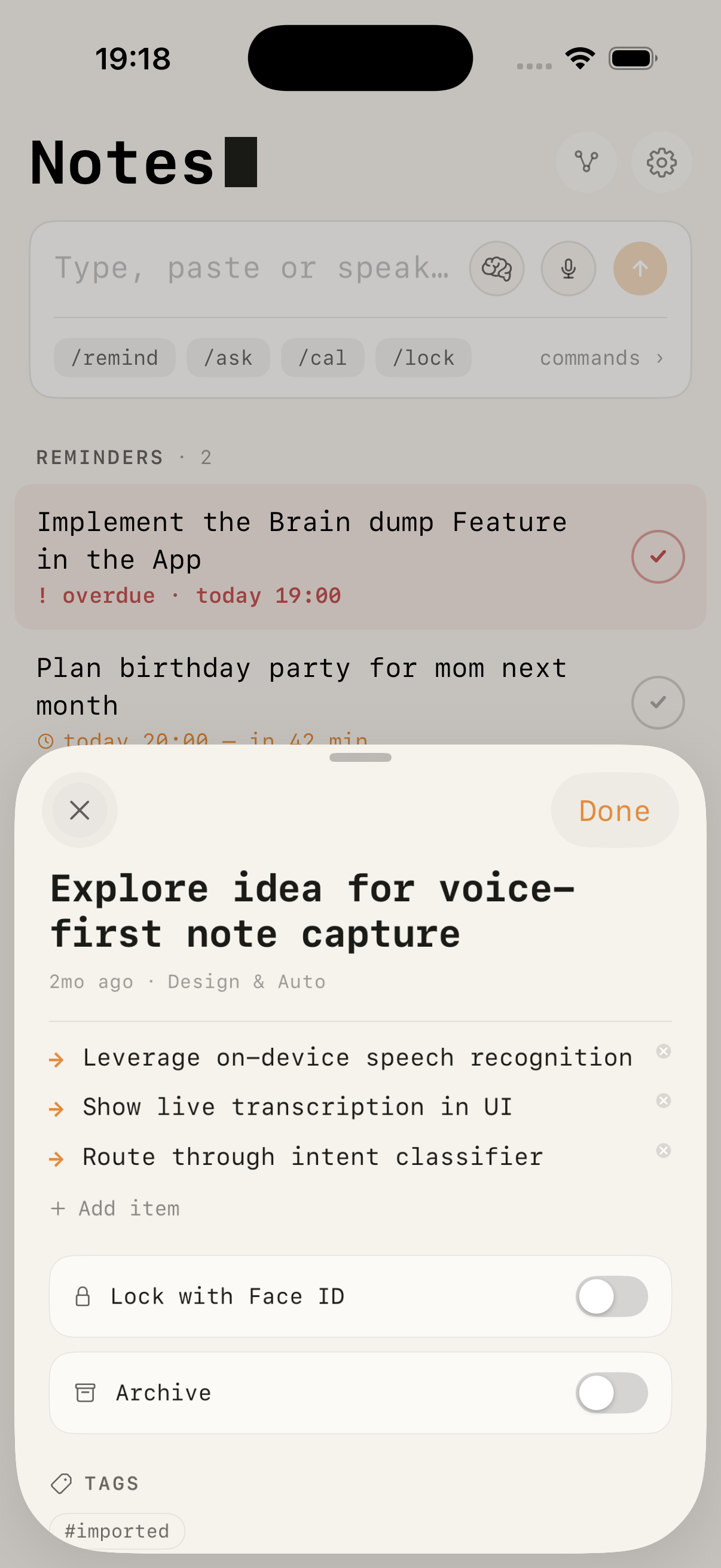
Note detail sheet with bullet items, Face ID lock and archive
01 · Note
Everything on one card
Bullet items, cluster, tags, Face ID lock and archive live in a single sheet.
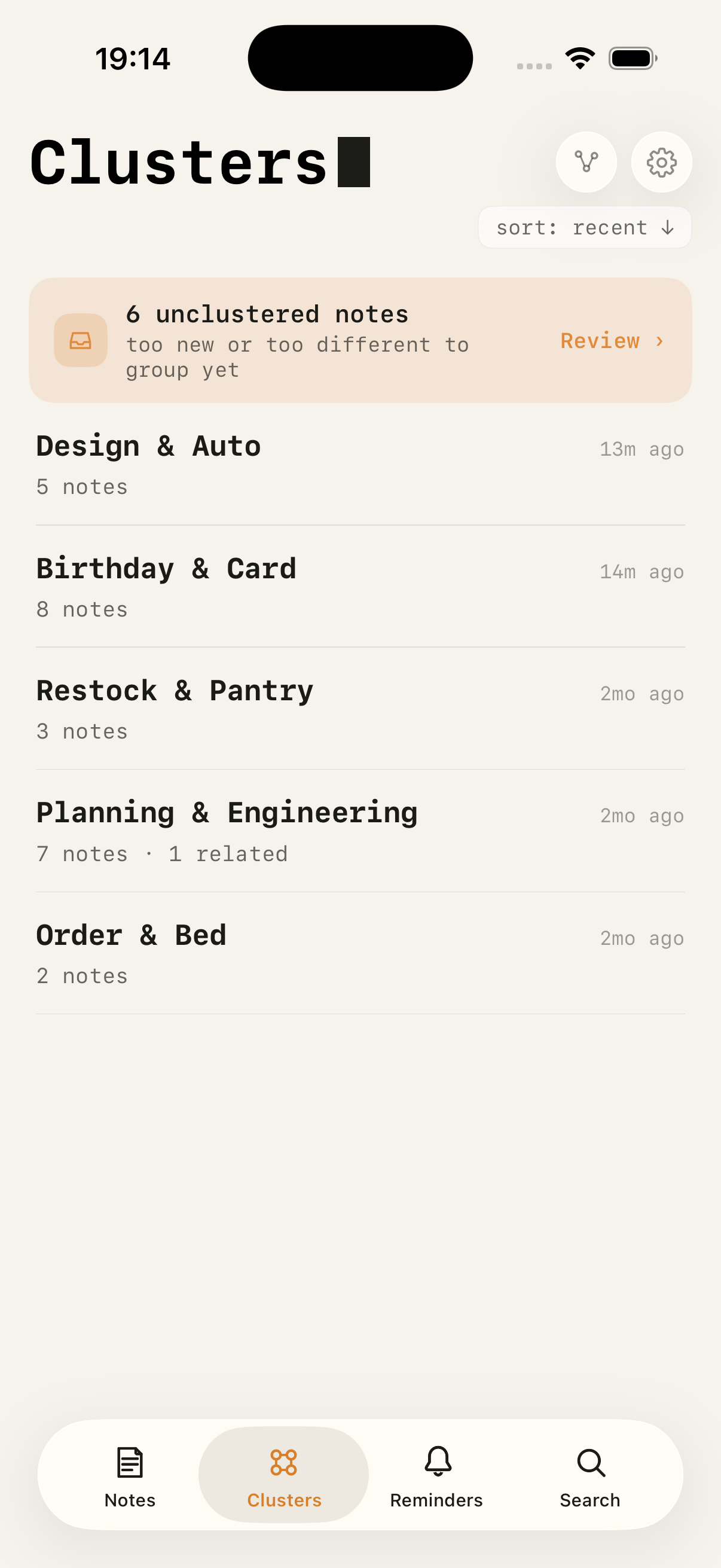
Automatic clusters list
02 · Clusters
Emergent topics
Groups form on their own. Notes too new or too different wait in a review inbox.
Knowledge graph
03 · Knowledge Graph
Everything, connected
Force-directed. Drag, zoom, pin, expand — semantic and cluster edges, colour-coded.
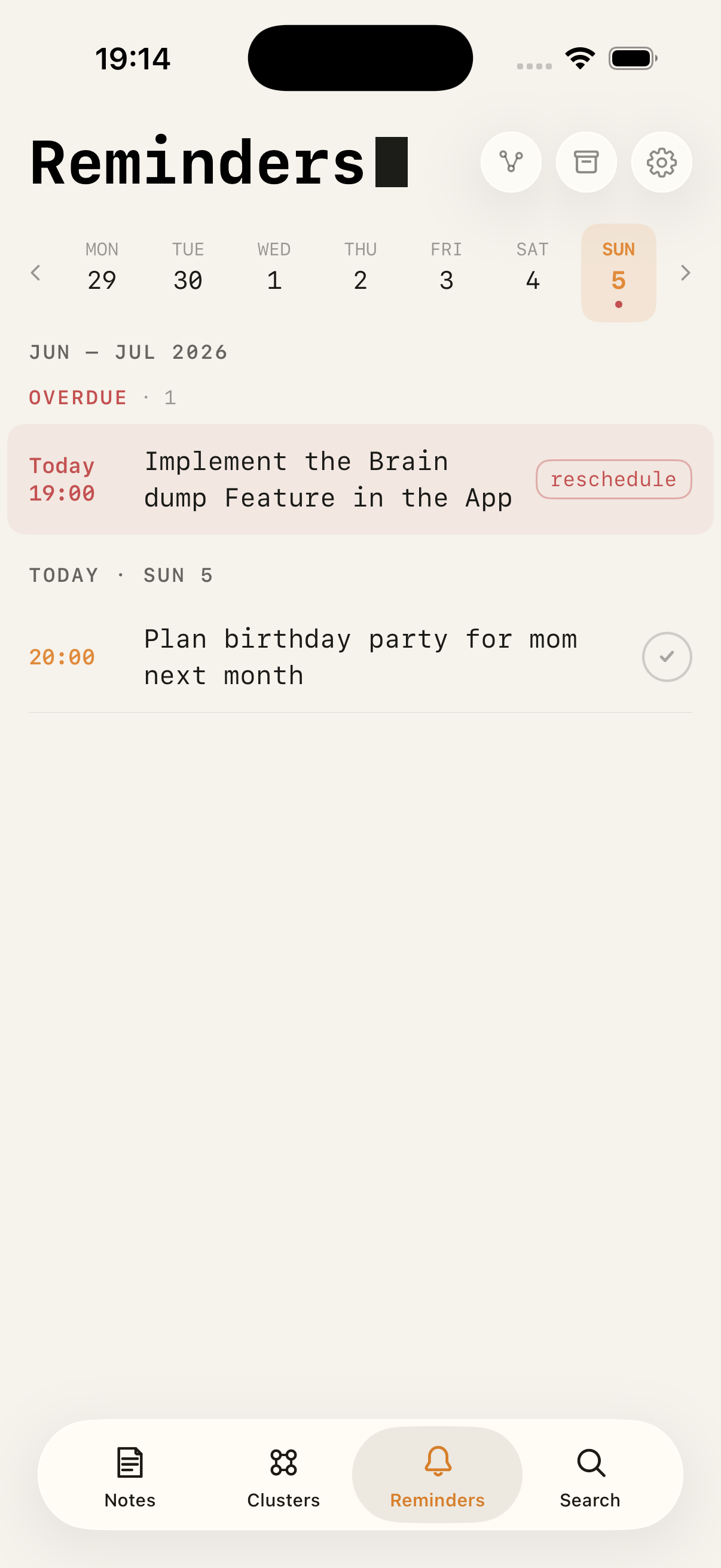
Reminders week view with overdue reschedule
04 · Reminders
Day · Week · Month
Parsed from plain language. Overdue items offer a one-tap reschedule.
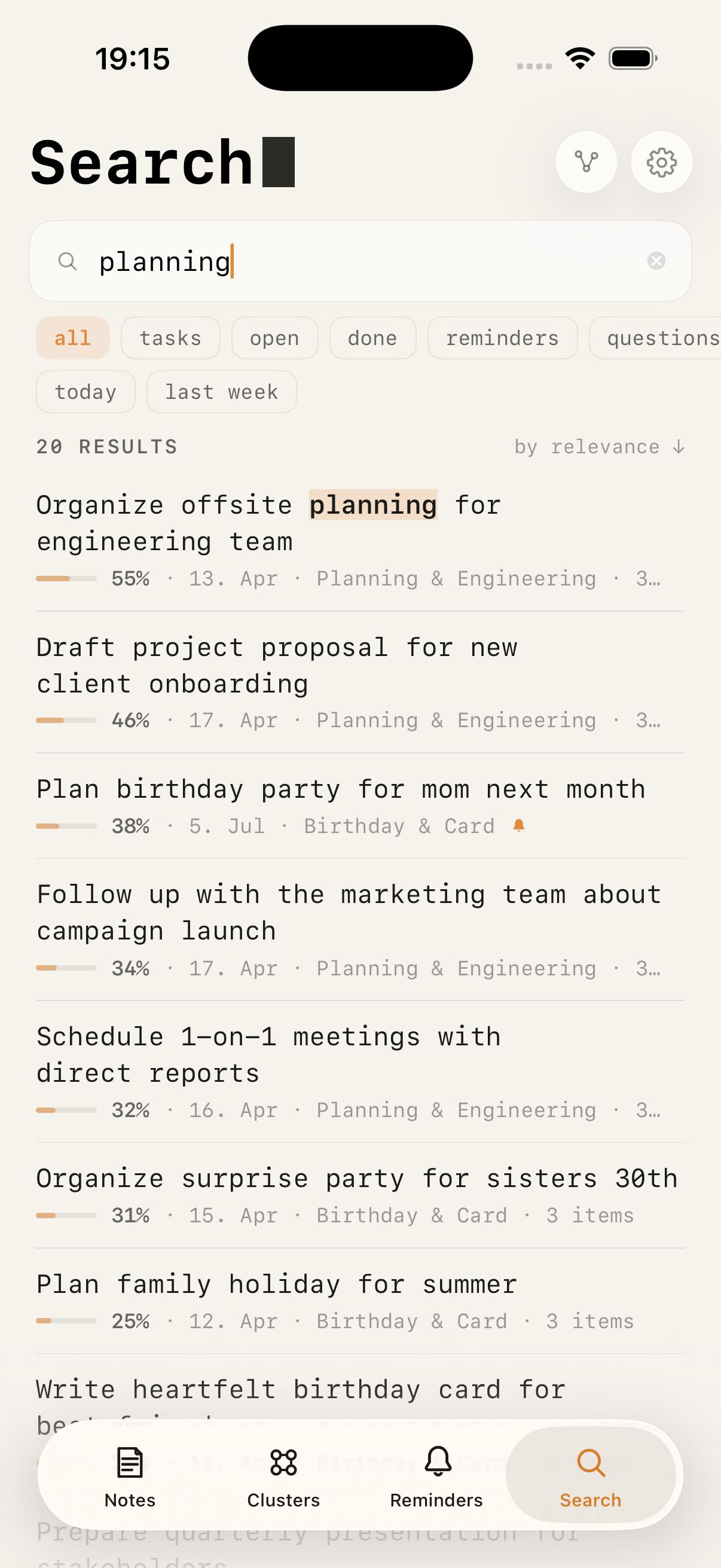
Semantic search with relevance scores
05 · Search
Semantic, not literal
Ranked by cosine similarity, with filters for tasks, reminders, questions and dates.
brain dump review
screenshot
coming soon
06 · Brain dump
Review before it lands
One dump becomes a checklist of proposed notes, reminders and events. Toggle, edit, confirm.
How it works

Built on Apple silicon.
Nothing leaves your phone.

Every embedding, every cluster, every generated answer runs through Core ML on the Neural Engine of your device. The app has no backend. Your notes never touch a server, not even ours — because we don't have one.

Stack
UISwiftUI + @ObservableiOS 17+
PersistenceSwiftData + GRDBmodels + vectors
EmbeddingsMiniLM-L12-v2 · multilingualCore ML · 384-d · ~47 MB
ClusteringFuzzy C-Means + Wardtwo-phase, m=2.0
SimilarityvDSP cosineAccelerate.framework
LLMLFM2.5 1.2B · Gemma 3 E4Boptional · LLM.swift · GGUF
VoiceSFSpeechRecognizeron-device only
Dump splitLLM + NL segmentationcoverage-checked
SystemApp Intents + CoreSpotlightSiri · Shortcuts · Action Button
CalendarEventKitsystem calendars
AuthLocalAuthenticationFace ID · Keychain
ExportCryptoKit AES-GCMHKDF-derived key
BackupAutomatic full backupsdue-check on open
Data flow
Input
Freeform textVoiceClipboard
Parse
Slash parserBrain dump splitterNSDataDetectorTag extractor
Embed
MiniLM-L12 (Core ML)Float16 · 384-dGRDB vector cache
Index
Fuzzy C-MeansCosine sim (vDSP)Smart connectionsSpotlight index
Query
Semantic search/ask · LLM/gen · LLM
Store
SwiftData (local)GRDB vectorsKeychainEncrypted backups
Slash commands
/remind
Parses a date/time and sets a local notification. Also marks the note as a task.
/tag work
Adds one or more tags; feeds the cluster and search index.
/ask
RAG pipeline. Retrieves top-K notes by cosine similarity, generates an answer, saves it.
/generate
Free LLM response (Smart Mode). Useful when you want explanation, not retrieval.
/dump
Splits one long capture into separate notes, reminders and events. Nothing is saved until you confirm the review.
/calendar
Creates an EventKit event. iOS syncs to iCloud, Google, Outlook automatically.
/lock
Seals the note behind Face ID. Password fallback stored in Keychain, device-only.
Under the hood

Six systems,
all on your device.

The short version of how meaning turns into structure. No cloud round-trip, no external API — every step runs inside the sandbox of your iPhone.

01
Clustering

Fuzzy C-Means,
two phases.

Saving a note runs its text through the MiniLM sentence encoder on the Neural Engine, producing a 384-dimensional vector that captures its meaning. Clustering works on distances between these vectors: instead of picking one bucket, every note gets a degree of membership in every cluster.

uij = 1 / Σk (dij / dik)2/(m−1)dij = 1 − cos(notei, centroidj), m = 2.0
"Q3 planning meeting"
Work0.72
Planning0.21
Ideas0.07
<50 ms
Real-time. New note → cosine vs existing centroids → FCM degrees. Memberships above 0.25 are stored; an existing one is only dropped below 0.20, so assignments never flicker at the boundary.
background
Drift correction. A background pass rebuilds the hierarchy with Ward's linkage, finds natural cut points via a gap statistic on merge distances, then a full FCM pass fixes incremental drift.
Throttled 1/3 s · generated notes excluded
02
Voice & intent

Embeddings classify
what you meant.

Speech is transcribed on-device and embedded with the same MiniLM model as your notes. Each of the five intents is a centroid, the averaged embedding of curated English and German example sentences. Above 0.7 confidence the embedding decides alone. Between 0.5 and 0.7 a detected date breaks the tie towards reminder or calendar. Below 0.5 the input is conservatively kept as a plain note.

R
Reminder
"remind me tomorrow at 10"
A
Ask
"what did I note about X?"
C
Calendar
"meeting friday 2pm with Sarah"
G
Generate
"explain photosynthesis"
N
Note
— default fallback
Tiebreakers: mein/ich/my/I → Ask · meeting/termin → Cal
03
/ask pipeline

Local RAG with
graceful fallback.

The question is embedded with the same model as your notes, so retrieval compares meaning to meaning. The 20 nearest active notes above cosine 0.3 become candidates; the LLM sees at most 10 of them, trimmed to 2,000 characters of context. Generation is optional, and the app stays useful without it.

embed(query) → top 20 · cosine ≥ 0.3
Then branch on state
smart_mode && hits
Prompt + retrieved notes → LFM2.5 1.2B or Gemma 3 E4B generates answer.
!smart_mode && hits
Extractive summary from top notes. No LLM required.
smart_mode && !hits
Free generation, tagged generated.
else
No-answer state with a prompt to record more.
Every answer saved back as a note with source links
04
/dump pipeline

One dump,
many items.

Free-form input, spoken, typed, or initialised with /dump, is split into proposed notes, reminders and events. Two paths produce the split; both end in the same review sheet, where every item can be edited, retyped or excluded before anything is created.

dump(text) → proposed items
Two paths to a split
smart_mode && ≤ 2,200 chars
LLM split. The model re-emits the dump one line per item, typed NOTE, REMINDER or EVENT, keeping each item's own date and time words. Beyond ~2,200 characters its 2,048-token context could not carry the text, so long dumps skip this path.
coverage < 50 %
Coverage check. If the items carry back under half of the input text, the response is discarded. Nothing gets silently lost.
else · basic mode
Heuristic split. Sentence segmentation, structural cuts at trigger phrases ("remind me", "denk dran") and between independently dated thoughts, adjacent grouping at cosine ≥ 0.45, then intent classification per segment. Capped at 40 segments; overflow is kept as one final item, never dropped.
Nothing is created until you confirm the review sheet
05
Connections

Three ways notes
hold together.

After every save the note's embedding is compared against all others with vDSP, Apple's vectorised math library, and up to ten connections are stored. The knowledge graph, the related-notes strip and merge suggestions all read from this one table.

S
Semantic · ≥ 0.60
cosine similarity between embeddings
T
Tag · 0.50
shared tags, fixed strength
D
Temporal · 0.45
same day, same cluster
M
Merge hint · ≥ 0.85
near-duplicates flagged, merged only on request
Edges form at 0.60 and drop only below 0.50 · generated and archived notes stay out
06
Backups

Backups without
a server.

iOS gives apps no reliable scheduler; background tasks run only when the system allows. So the app checks on every return to the foreground whether the last backup is older than your chosen interval. Notes only change while the app is open, which is why this pattern never misses data.

on open
Due-check. Last backup older than your interval → full backup into a folder you choose, on-device or iCloud Drive.
at rest
AES-GCM container. The key is derived from your password, never stored in the file. Backups use the same encrypted format as manual export, so any backup restores through the normal import flow.
Key derived from your password via HKDF · CryptoKit
Privacy

Your notes
stay yours.

Local AI Notes has no backend. There is no account to create, no telemetry, no analytics SDK, no third-party tracker. Every model runs on-device. Optional iCloud sync uses your personal CloudKit container — we never see a byte.

Built in Germany. GDPR-compliant by design — mostly because there's nothing to collect.

Zero egress.

These claims are auditable. The source is open; the network sandbox is empty.

No analytics
No accounts
No trackers
No ads
No server
FAQ

Frequent questions.

Does it work without internet?+
Yes — fully. The only time the app uses the network is the initial model download if you opt into Smart Mode. After that, airplane mode is fine.
Which AI models are supported?+
Two Q4_K_M GGUF models, downloaded on-demand from Hugging Face: LFM2.5 1.2B (Liquid AI, ~800 MB, fast on older devices) and Gemma 3 E4B (Google, ~4.5 GB, multilingual and balanced). Inference runs through LLM.swift (llama.cpp). Basic mode without any LLM is fully functional — /ask falls back to extractive summarisation.
How large is the embedding cache?+
384 floats per note (~1.5 KB), stored as Float16 in a GRDB/SQLite table. 10,000 notes ≈ 15 MB. The cache is fully rebuildable from source notes at any time.
Can I export my notes?+
Yes — JSON with full note data, optionally encrypted with AES-GCM (CryptoKit, HKDF key derivation from a password you set). The app auto-detects encrypted files on import. Generated /ask notes are excluded from export.
What happens when I dump several thoughts at once?+
The dump is split into proposed items before anything is saved. In Smart Mode the local LLM does the split, guarded by a coverage check that rejects any response carrying back less than half of your text. Without a model, an on-device pipeline takes over: sentence segmentation, structural cuts at trigger phrases and date anchors, embedding-based grouping of adjacent sentences, and intent classification per segment. Both paths end in the same review sheet, in English and German.
Can I use it with Siri and the Action Button?+
Yes. App Intents expose voice capture, new note, reminder and search to Siri, the Shortcuts app, Spotlight and the Action Button, with English and German phrases. "Start voice note in Local AI Notes" begins recording without opening the app first.
Does it work on iPad or Mac?+
iPhone first. An iPad layout is on the roadmap; Mac via Catalyst is being evaluated once the model pipeline is stable on Apple Silicon Macs.